
Customer story · Multi-branch study abroad consultancy
How Skymark Education moved every branch, student and application onto Xale CRM
Xale moved Skymark Education's branches, students, applications and history across from their previous CRM, then set up country-based access, role follow-ups, tracks and automations for Meta, WhatsApp and calls.
- On Xale since March 2026
- Study Abroad template
- Moved from their previous CRM
- Branches across Kerala
Skymark Education on Xale, at a glance
- Students, applications, notes, follow-ups, documents, call logs and chats migrated from their previous CRM
- Full history moved
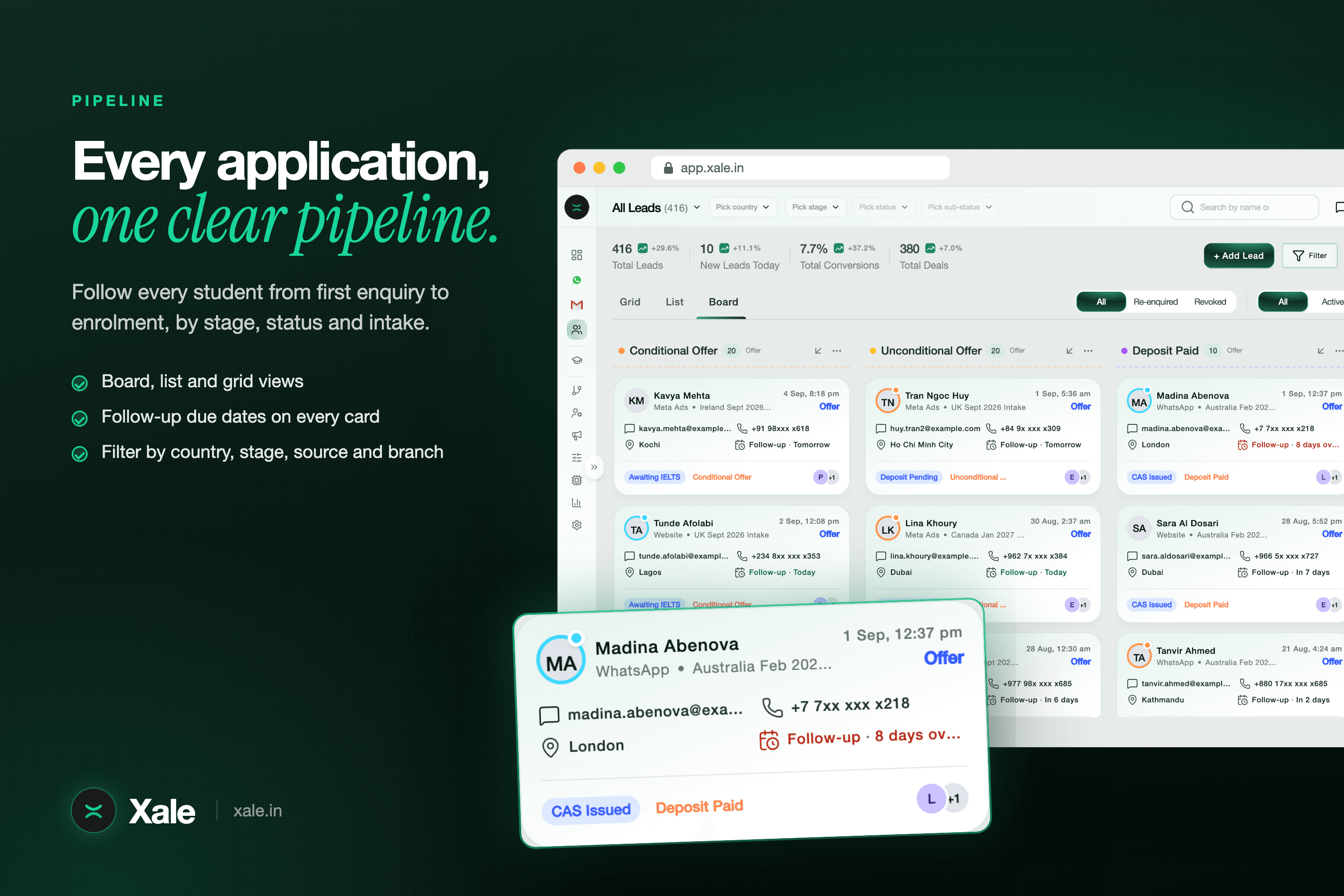
- Every university application tracked on its own, from Enquiry to Enrolled
- A deal per application
- Each counsellor sees, and is given, the countries they handle
- By destination
- Telecallers, counsellors and the application, SOP, loan, interview and visa teams each keep their own follow-up
- Per role
What Xale did
What we built and moved for Skymark Education
Migration from their previous CRM
We moved the university and course catalogue, users, roles, branches and each person's country access first, then every lead source, campaign and form, and finally the students, their applications as deals and the full history: notes, follow-ups, documents, activity, call logs and internal chats. Every status in the old system was mapped to a stage in the new pipeline.
A live bridge until the cut-over
While the team moved across, a bridge kept copying new changes from the old system, along with Meta leads and Wati messages, into Xale. Nothing fell between the first import and the day the old CRM was switched off.
Pipeline, deals and tracks
One pipeline from Enquiry to Enrolled, with statuses and sub-statuses under each stage. Each university application is its own deal, linked to the university and course. Loan, SOP and interview preparation run as tracks beside the pipeline, each with its own owner and follow-up.
Branches, roles and country access
Branch heads see their branch, regional managers and country heads see their territory, and each counsellor sees and receives the destinations they handle. Telecallers, counsellors and the specialist teams each hold their own follow-up on the same student.
Meta, WhatsApp and calls
One Meta source across their Facebook Pages and ad accounts, with ad spend in the campaign reports. WhatsApp runs through Wati, with approved templates sent by automations. Counsellors' calls and recordings are logged on the lead from their Android phones.
Automations that route the work
New enquiries get a branch and a destination and are shared among the counsellors who handle that country. A WhatsApp welcome goes to every new enquiry, an out-of-hours reply gives the branch contact, idle enquiries are reshuffled after 15 days, and visa-stage applications go to the visa documentation and visa teams.
The story
The team
Skymark Education is a study abroad consultancy with branches across Kerala. Telecallers make the first contact and counsellors own the student and the university shortlist. Behind them sit specialist teams for applications, SOPs, education loans, interview preparation, visa documentation and visas. Branch heads run the branches, and regional managers and country heads look after their territories and destinations. Students apply to the UK, Ireland, Germany, France and the rest of Europe, Canada, Australia, New Zealand and the USA.
What they needed
- Their whole history brought across from the CRM they had been using, without a gap on the day they switched.
- One record per student, with each university application tracked on its own.
- Clear ownership when several teams work the same student, each with its own next step.
- Access by branch for branch heads and by destination for counsellors and country heads.
- Meta leads, WhatsApp and counsellor calls on the lead, not in separate tools.
Moving off the old CRM
We ran the migration in the order the data depends on itself. The university and course catalogue went first, then users, roles, branches and each person's country access, then lead sources, campaigns and forms. Only then did the students move, with each application as its own deal and every piece of history attached: notes, follow-ups, documents, activity, call logs and the team's internal chats.
The old system's statuses did not map one to one onto a clean pipeline, so each one was mapped deliberately to a stage and status in Xale. While the team moved across, a live bridge kept copying new changes, Meta leads and Wati messages from the old system, so the team could start working in Xale before the old CRM was switched off. The migration was complete in June 2026, and the bridge was retired with it.
How the workspace runs
Every enquiry lands in one pipeline from Enquiry to Enrolled. A student's applications are deals of their own, each linked to its university and course, so one student can hold several applications at different stages. Loan, SOP and interview preparation run as tracks beside the pipeline, each with its own owner and follow-up.
Access follows the way Skymark is organised. A branch head sees the branch, country heads and regional managers see their territory, and each counsellor sees the destinations they handle. The same country field drives distribution: a new enquiry gets a branch and a destination and is shared among the counsellors who handle that country.
Each role keeps its own follow-up on the student, so the telecaller's callback, the counsellor's shortlist call and the visa team's document chase never overwrite each other. That is the part of Xale we describe on the follow-up management page.
Meta, WhatsApp and calls in one place
Enquiries from their Facebook Pages and ad accounts arrive through one Meta source, and the campaign reports show the ad spend next to the leads it bought. WhatsApp runs through Wati: a welcome goes to every new enquiry, an out-of-hours reply gives the branch contact, and approved templates go out from automations. Counsellors' calls, with their recordings, are logged on the lead from their Android phones, so a manager can hear the conversation behind a status change.
Timeline
How the work ran
March 2026
Skymark Education's workspace goes live on Xale.
April 2026
Branches roll out, each with its own team and access.
April to May 2026
The catalogue, users and sources move across, then students, applications and their history, with the live bridge keeping both systems in step.
June 2026
Migration complete: the previous CRM is retired and the bridge switched off.
August 2026
Meta ad spend flows into the campaign reports, next to the leads it bought.
September 2026
Loan, SOP and interview preparation tracks get their own owners and follow-ups.
In the setup
What runs in the workspace
- Study Abroad template
- University and course catalogue
- Meta Lead Ads
- WhatsApp via Wati
- Android call recording
- Tracks: Loan, SOP, Interview
- Country and campaign reports
The product behind it
Read how each part works
More customer stories
All customers →Study abroad consultancy
Sterling Abroad
A study abroad consultancy recruiting for the UK, Ireland, Europe, Australia and beyond. We migrated them from LeadSquared with their full history and built team routing, mock-interview tracks and role dashboards.
Read the story →Multi-centre academy
Adi Institute
A multi-centre academy across Kerala, Bangalore and online. We connected every Meta Page, set up fair counsellor routing and built a dashboard pack for sources, courses, centres and conversions.
Read the story →University admissions team
Jain University
The admissions team at Jain University's Kochi campus. We connected the campus website, spreadsheet forms and Meta Lead Ads so every enquiry lands in one pipeline, tracked programme by programme.
Read the story →